全球主机交流论坛

 找回密码
 注册

QQ登录

只需一步,快速开始

CeraNetworks网络延迟测速工具IP归属甄别会员请立即修改密码
查看: 4016|回复: 40

windows远程桌面《出现了内部错误》终极解决方案!!!

  [复制链接]
IT狗 该用户已被删除
发表于 2021-7-25 16:55:00 | 显示全部楼层 |阅读模式
提示: 作者被禁止或删除 内容自动屏蔽
发表于 2021-7-25 17:44:55 | 显示全部楼层
改了,仍然需要点无数次才能进
发表于 2021-7-25 19:04:04 | 显示全部楼层
本帖最后由 zxxx 于 2021-7-25 23:40 编辑
图王 发表于 2021-7-25 17:08
如此繁杂操作我等凡夫俗子怎能记住,请问如何一键设置


以下设置基于 Windows Server 2022

另存为 rdp.reg 双击导入注册表。

  1. Windows Registry Editor Version 5.00

  2. [HKEY_LOCAL_MACHINE\SYSTEM\CurrentControlSet\Control\Terminal Server\WinStations\RDP-Tcp]
  3. "SecurityLayer"=dword:00000000
复制代码


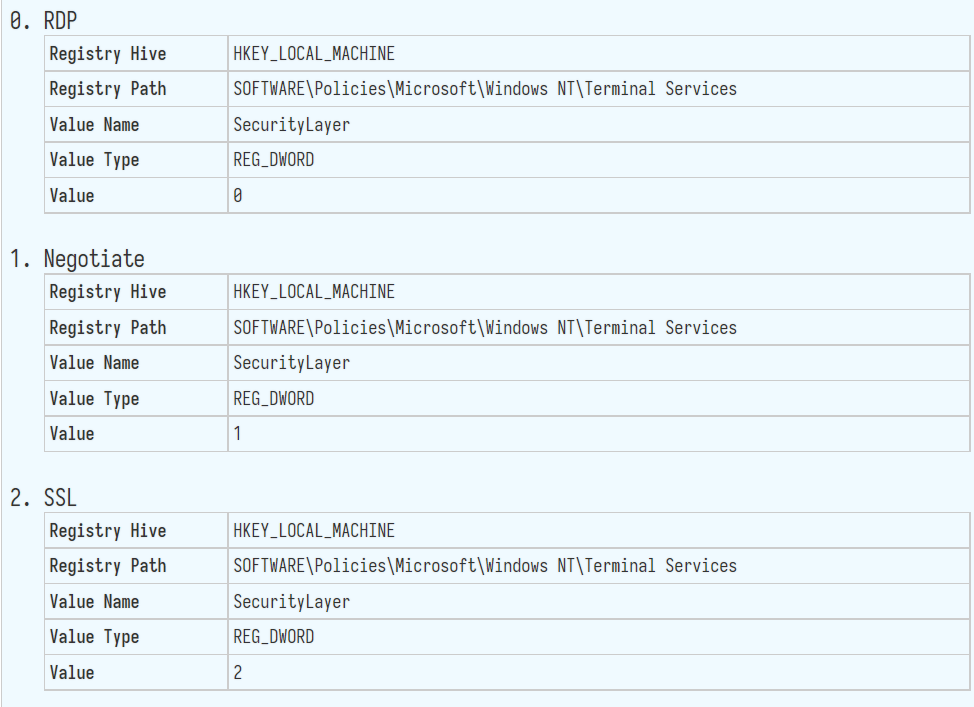
Security Layer 0 – With a low security level, the remote desktop protocol is used by the client for authentication prior to a remote desktop connection being established. Use this setting if you are working in an isolated environment.

Security Layer 1 – With a medium security level, the server and client negotiate the method for authentication prior to a Remote Desktop connection being established. As this is the default value, use this setting only if all your machines are running Windows.

Security Layer 2- With a high security level, Transport Layer Security, better knows as TLS is used by the server and client for authentication prior to a remote desktop connection being established. We recommend using this setting for maximum security.

https://admx.help/?Category=Windows_10_2016&Policy=Microsoft.Policies.TerminalServer::TS_SECURITY_LAYER_POLICY

点评

计算机\HKEY_LOCAL_MACHINE\SOFTWARE\Policies\Microsoft\Windows NT\Terminal Services  发表于 2021-7-25 22:29
发表于 2021-7-25 22:17:01 | 显示全部楼层
临云 发表于 2021-7-25 22:15
大佬,请问是复制到bat文件里,双击执行吗

复制,另存为 rdp.reg 双击导入。

点评

谢谢大佬  发表于 2021-7-25 22:17
发表于 2021-7-25 16:55:21 | 显示全部楼层
很好啊  技术贴必顶
发表于 2021-7-25 16:56:41 | 显示全部楼层
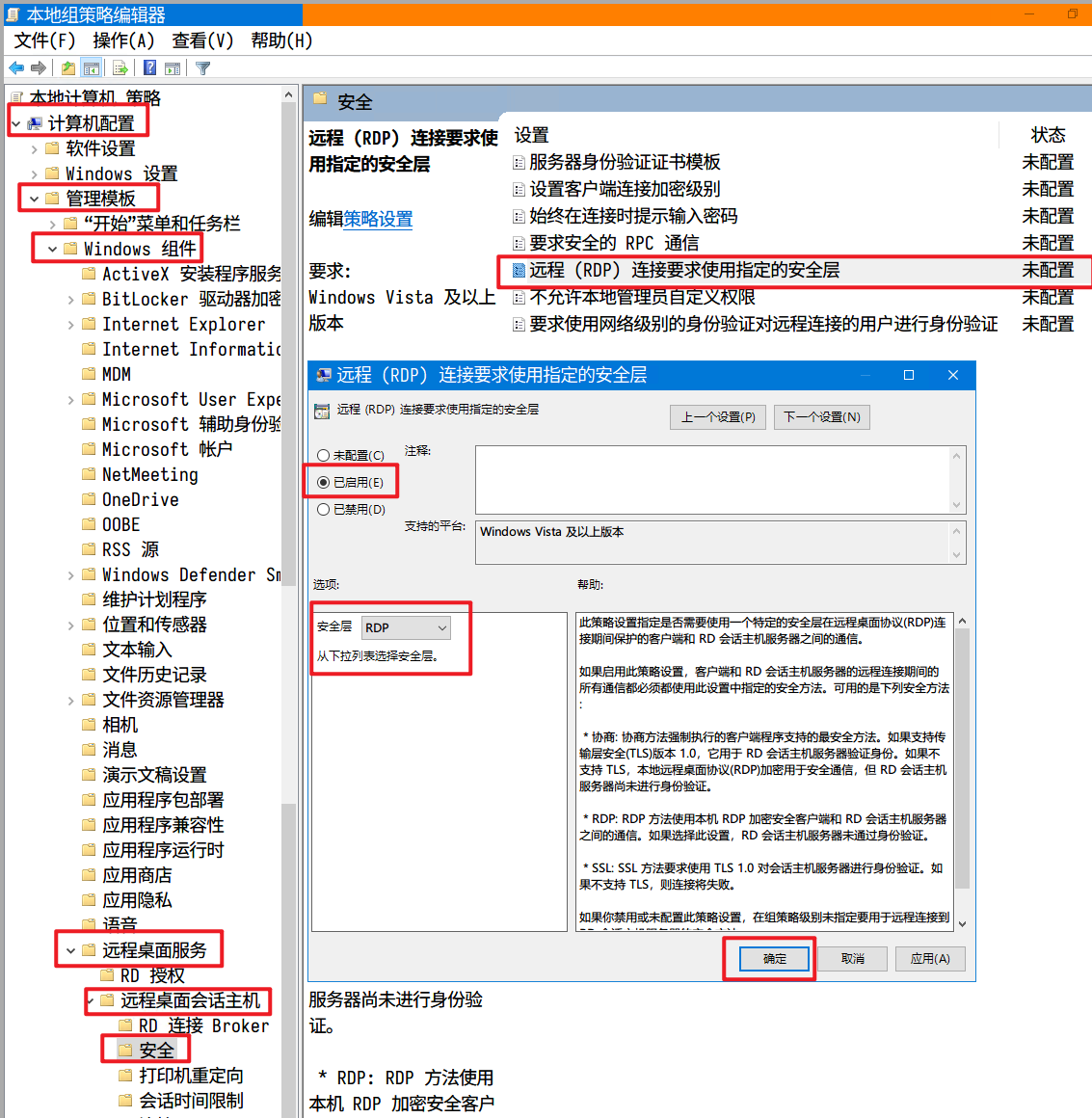
启用 -- 安全层选择  就可以解决嘛。牛皮
发表于 2021-7-25 17:03:58 | 显示全部楼层
本帖最后由 笑花落半世琉璃 于 2021-7-25 17:05 编辑

其实有vnc的,连一下vnc然后登录到桌面,再试一次rdp就不会提示内部错误了,也不用重启什么
发表于 2021-7-25 17:06:22 | 显示全部楼层
马克一下备用
发表于 2021-7-25 17:07:13 | 显示全部楼层


此策略设置指定是否需要使用一个特定的安全层在远程桌面协议(RDP)连接期间保护的客户端和 RD 会话主机服务器之间的通信。

如果启用此策略设置,客户端和 RD 会话主机服务器的远程连接期间的所有通信都必须都使用此设置中指定的安全方法。可用的是下列安全方法:

* 协商: 协商方法强制执行的客户端程序支持的最安全方法。如果支持传输层安全(TLS)版本 1.0,它用于 RD 会话主机服务器验证身份。如果不支持 TLS,本地远程桌面协议(RDP)加密用于安全通信,但 RD 会话主机服务器尚未进行身份验证。

* RDP: RDP 方法使用本机 RDP 加密安全客户端和 RD 会话主机服务器之间的通信。如果选择此设置,RD 会话主机服务器未通过身份验证。

* SSL: SSL 方法要求使用 TLS 1.0 对会话主机服务器进行身份验证。如果不支持 TLS,则连接将失败。

如果你禁用或未配置此策略设置,在组策略级别未指定要用于远程连接到 RD 会话主机服务器的安全方法。
发表于 2021-7-25 17:08:03 | 显示全部楼层
如此繁杂操作我等凡夫俗子怎能记住,请问如何一键设置
发表于 2021-7-25 17:10:22 | 显示全部楼层
技术贴必顶
您需要登录后才可以回帖 登录 | 注册

本版积分规则

Archiver|手机版|小黑屋|全球主机交流论坛

GMT+8, 2026-5-15 12:33 , Processed in 0.071065 second(s), 17 queries , Gzip On, MemCache On.

Powered by Discuz! X3.4

© 2001-2023 Discuz! Team.

快速回复 返回顶部 返回列表